
Open BiteLume, place the whole plate or bowl in even light, and take one sharp photo. Check every recognized food and portion before saving. Add oils, sauces, drinks, fillings, seconds or other items outside the frame. The result estimates calories and macros; it does not measure exact weight or reveal a recipe hidden inside the meal.
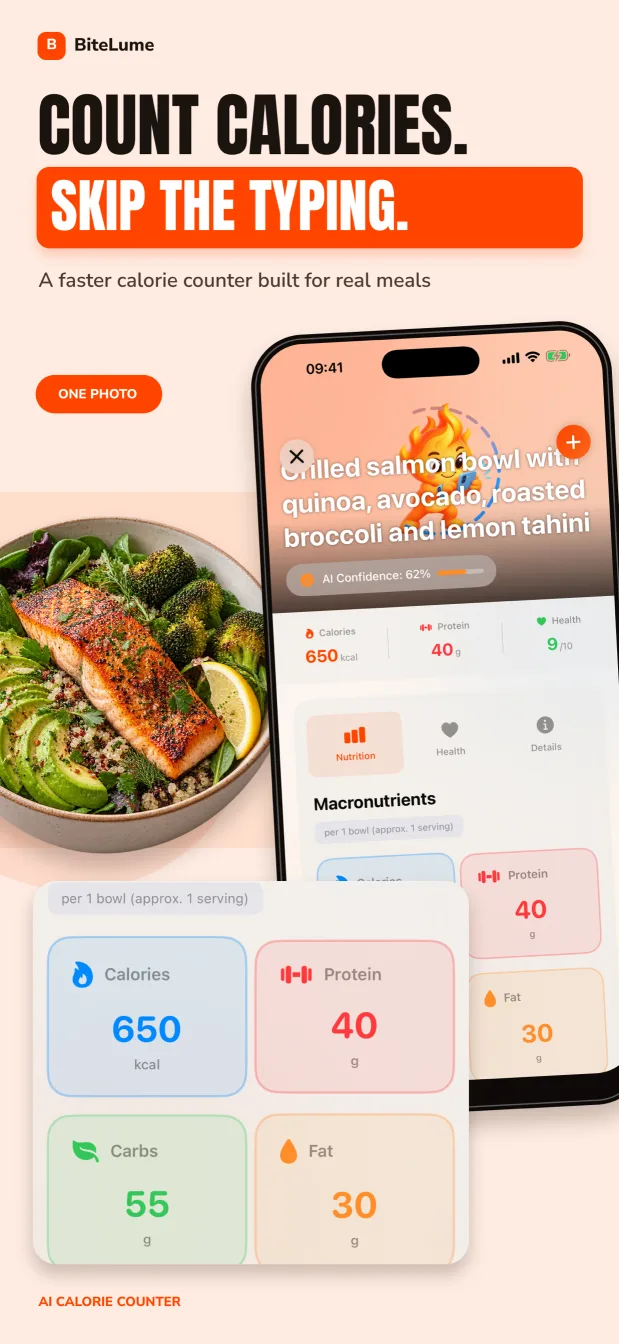
What a calorie estimate from a photo actually does
A photo-based calorie tool combines several tasks. It first has to separate the meal into visible items, recognize each food, estimate how much of each item is present and connect those estimates with nutrient data. An error at any stage changes the final calorie total. A chicken thigh recognized as chicken breast, for example, can produce a different estimate even when the visible portion looks similar.
Research reviews of image-based dietary assessment describe portion size as especially difficult because a single two-dimensional image does not provide exact scale, depth, ingredients or cooking method. That is why a useful workflow includes a human review step instead of accepting the first number automatically.
The best question is not whether a photo reveals the true calorie count. It is whether the photo provides a sensible, editable starting point that helps you log consistently. For general habit tracking, a reviewed estimate can be much more practical than leaving a meal unrecorded.
Take a photo the scanner can interpret
Photograph the meal before you start eating. Keep the whole plate or bowl inside the frame and use natural or even indoor light. A slightly angled overhead view usually shows both the surface area and some height. Avoid a low side angle that hides food behind other food, and do not cover the plate with your hand or cutlery.
Separate components when practical. Rice, curry, salad and dressing are easier to review when each has a visible boundary than when everything is piled together. If a dish has important ingredients below the surface, one second photo or a short note can supply context the main image lacks.
- Include the full serving, including side dishes and calorie-containing drinks.
- Use a familiar plate or bowl so the apparent scale is less ambiguous.
- Photograph sauces in ramekins or state how much you used.
- For a sandwich, wrap or layered dish, show the filling when possible.
- Log seconds as a second image rather than trying to remember them later.
Review the result in the right order
Start with food identity, then portion, then preparation. There is little value in fine-tuning a portion when the food itself is wrong. Check specific distinctions that affect the nutrient entry: fried or grilled, skin-on or skinless, sweetened or unsweetened, creamy or tomato-based, and lean or higher-fat versions.
Next compare the assumed serving with what you ate. Nutrition databases commonly report nutrients per 100 grams or per defined serving, while a restaurant scoop or home bowl may be larger or smaller. The FDA also notes that a label serving size reflects what people typically consume; it is not a recommendation, and one package can contain more than one serving.
Finally, add information the camera cannot infer. Oil absorbed during frying, butter stirred into vegetables, mayonnaise inside a sandwich and sugar in a drink may be visually subtle. Recipe quantities are also hidden in casseroles, curries, soups and smoothies. When you know an ingredient was used, that knowledge should override visual guesswork.
Swipe to see the full table
| Check | What the photo may show | What you should confirm |
|---|---|---|
| Food | Visible type and shape | Exact variety and cooking method |
| Portion | Relative area and apparent volume | Serving size, leftovers and seconds |
| Recipe | Visible components | Oil, sauce, filling and ingredient amounts |
| Meal | Food inside the frame | Drinks, condiments and anything eaten off-camera |
Related: Track protein, carbohydrates and fat from a meal photo
Fix common iPhone food-scan problems
If a photo is blurry, strongly backlit or cropped, retake it before eating while the full serving is still available. Wipe a visibly smudged lens, avoid digital zoom and tap the plate on the iPhone screen to set focus. For a deep bowl, use a gentle diagonal angle that shows both the contents and some depth.
If BiteLume identifies the wrong food, expose the detail that distinguishes it. Turn a sandwich so the filling is visible, separate overlapping foods, remove a reflective lid or choose the actual preparation during review. Do not keep rescanning simply to obtain a preferred calorie number; correct the known mismatch once and keep the remaining uncertainty visible.
A scan can also describe what was served rather than what was eaten. Reduce the saved portion when you leave a meaningful amount, and create another entry for seconds or an item that arrived after the first photo.
- Blurry image: steady the phone, improve the light and retake before eating.
- Glare or dark shadows: change the angle or remove reflective packaging.
- Hidden filling: briefly open or turn the sandwich, wrap or layered food.
- Crowded plate: make the boundaries between major foods easier to see.
- Wrong portion: keep the plate edge visible and adjust the amount during review.
- Missing extras: add drinks, sauces, seconds and off-camera items before saving.
A practical example: a rice, chicken and salad plate
Suppose the photo shows grilled chicken, rice and a side salad. First confirm that the chicken is grilled rather than breaded or fried. Then compare the rice estimate with the scoop you served. If you cooked the meal, add the oil used on the chicken and the dressing measured onto the salad. If you left part of the rice, reduce the logged portion rather than saving the amount originally served.
This component-by-component review is more reliable than trying to judge the plate as one unnamed mixed meal. It also makes the entry easier to edit the next time you eat a similar meal. You are not chasing a false level of precision; you are making the assumptions visible and repeatable.
For a mixed dish, use any recipe, package or restaurant information you have. If none exists, keep the app estimate and note the uncertainty.
Use the estimate for patterns, not certainty
A reviewed photo estimate can help answer practical questions: Do lunches tend to be larger than expected? Are sauces often missing from the diary? Is protein regularly low at breakfast? Those patterns become clearer across repeated entries even when no single meal is known perfectly.
Consistency matters more than changing your method every day. If you usually photograph the complete serving and review hidden ingredients, comparisons across days are easier to interpret. When a meal is unusually important to measure, such as a recipe you are standardizing, use labels, ingredient quantities and a kitchen scale rather than relying on a photo alone.
Do not use a photo-calorie estimate to make medication decisions or manage a condition that requires precise nutrient dosing. People who need clinically directed carbohydrate, electrolyte, protein or energy intake should follow a qualified clinician's plan and use the measurement method that clinician recommends.
The scan saves the identification and lookup work. Your knowledge of the recipe, portion and missing extras supplies the context a camera cannot capture.
Your repeatable photo-calorie checklist
Build a short routine you can complete in under a minute. Photograph first, verify the main foods, scan for invisible additions, account for what you actually ate and then save. If you discover better information later, update the entry rather than keeping a known mistake.
For frequently repeated meals, compare new portions with your earlier reviewed entries. The goal is not to force every breakfast into the same number. It is to reduce avoidable inconsistency while leaving room for normal variation in recipes and appetite.
- Capture the whole meal before the first bite.
- Confirm every detected food and its preparation.
- Adjust the portion using labels, household measures or known amounts.
- Add hidden fats, sauces, drinks, toppings and seconds.
- Save the meal and evaluate trends over several days.
How to use BiteLume for this
- Open BiteLume on your iPhone and photograph the complete plate or bowl in bright, even light.
- Review the detected food names, preparation methods and portion assumptions against the meal in front of you.
- Correct any mismatch and add oils, dressings, drinks, fillings, seconds or other extras the photo could not show.
- Save the reviewed estimate, then use daily and weekly patterns instead of treating one scan as an exact measurement.
Photos cannot reliably reveal hidden oils, dressings, recipe quantities or exact weight. Treat the scan as a starting point and correct what you know.
Questions people also ask
Can an iPhone calculate calories from a food photo?
An iPhone app can use a meal photo to identify visible foods and estimate portions, calories and macros. The result remains an estimate because one image cannot measure exact weight or reveal every ingredient.
How accurate is a calorie estimate from a picture?
Accuracy varies with food recognition, portion assumptions, lighting, angle and hidden ingredients. Clear, separated foods are usually easier to review than curries, casseroles, sauces and filled foods.
Can a food photo detect cooking oil and sauces?
Not reliably. A photo may show a visible sauce, but it cannot determine how much oil entered a pan or how much dressing was mixed into a meal. Add quantities you know during review.
What should I do when the scanner identifies the wrong food?
Choose the food and preparation you actually ate, adjust the portion, and add missing components. If the image is unclear, retake it before eating with better light and less overlap.
Make the next meal easier to track.
Use a photo to get a calorie and macro starting point, review the details, and keep your progress in one place.
Download on theApp Store